- 5 best grammar checkers (free and paid versions available)
- 1. Grammarly: Best for all-purpose grammar checking and editing
- Pros
- Cons
- 2. ProWritingAid: Best for detailed grammar reports
- Pros
- Cons
- 3. Wordtune: Best for rewriting
- Pros
- Cons
- 4. LanguageTool: Best for multilingual people
- Pros
- Cons
- 5. Hemingway: Best for clear writing
- Pros
- Cons
- How to make the most of the grammar checkers
- Use real-time checking
- Integrate with your writing apps
- Improve your grammar
- Get feedback from experts
- Use these apps but don’t skip learning grammar
- Frequently Asked Questions
- What features do top grammar checkers offer?
- Are there free versions available for these grammar checkers?
- Which grammar checker is best for rewriting?
- What makes Grammarly stand out among grammar checkers?
- How can I enhance my grammar skills while using grammar checkers?
Top grammar checkers go beyond simple word corrections; they offer rewriting suggestions, assess readability, and include browser extensions for seamless integration with your favorite applications. Whether you’re crafting an email or an academic essay, these tools ensure your writing is both error-free and captivating.
After evaluating various tools, we’ve compiled a list of the top 5 grammar checkers available. Each of these options offers a free version, allowing you to test them out before making any financial commitment.
5 best grammar checkers (free and paid versions available)
Let’s take a closer look at the five grammar correction tools we’ll be discussing, helping you choose the one that best suits your needs.
|
Grammar checker |
Key features |
Pricing |
Available as |
|
Grammarly |
|
Free Premium for $12 per month Business for $15 per month |
Desktop app Browser extension iOS and Android apps |
|
ProWritingAid |
|
Free Premium for $10 per month Premium Pro for $12 per month |
Desktop app Browser extension Web editor |
|
Wordtune |
|
Free Advanced for $6.99 per month Unlimited for $9.99 per month |
Desktop app Browser extension Web editor iOS app |
|
LanguageTool |
|
Free Premium ranges between $4.99 and $24.90 |
Desktop app Browser extension Web editor iOS and Android apps |
|
Hemingway |
|
Free 5K Plan for $10 per month 10K Plan for $15 per month |
Desktop app Web editor |
1. Grammarly: Best for all-purpose grammar checking and editing
- Best use case: Checking English grammar on various documents on your computer and mobile phone
- Pricing:
- Free
- Premium for $12 per month
- Business for $15 per month
- Available as: Desktop app, browser extension, web editor, iOS and Android apps
In our view, Grammarly stands out as the top grammar checker app available. Whether you’re looking to proofread an email, receive tips for clearer writing, or identify spelling errors, Grammarly has you covered.
Grammarly offers a robust free version compatible with over 500,000 applications, including popular social media platforms, Google Docs, and various email services. You can also easily copy and paste your text into its web editor for quick spell checks and writing suggestions. Beyond just grammar corrections, Grammarly gives you an overall writing score and lets you set specific goals for your desired tone. If you opt for the premium version, you’ll unlock additional features, including more monthly AI writing prompts, advanced suggestions, and comprehensive plagiarism checks.
The image below shows Grammarly’s suggestions for a text containing double words, wrong subject-verb agreement, and redundant phrases.

Pros
- Instant grammar and spelling corrections
- User-friendly design, available as a browser extension, desktop app, web editor, and mobile app
- Style and tone improvement suggestions for American, British, Canadian, Australian, and Indian English
Cons
- The free version has limited style suggestions and does not have a rewriting feature
- May give inaccurate punctuation suggestions at times, especially for complex sentences or creative writing
2. ProWritingAid: Best for detailed grammar reports
- Best use case: Getting insights into your grammar errors and writing style with its analysis reports
- Pricing:
- Free
- Premium for $10 per month
- Premium Pro for $12 per month
- Available as: Desktop app, browser extension, and web editor
One of the most impressive aspects of ProWritingAid is its comprehensive writing analysis reports. In addition to correcting errors, this app offers in-depth feedback on your writing style, readability, and vocabulary, helping you enhance your skills and produce polished content.
This tool is designed to assist a variety of users, including creative writers, students, and non-native speakers. Creative writers benefit from the “dialogue tags” feature, which helps them track the usage of common words like “said” and “asked,” ensuring they strike the right balance. Students can switch to an academic style setting to pinpoint informal language in their work. Meanwhile, non-native speakers can easily identify and correct grammar mistakes, such as incorrect preposition usage or improper adjective order.
Here’s an example demonstrating the capabilities of ProWritingAid. Above the sample text, you’ll find a variety of writing reports generated by the tool, such as a comprehensive summary, detailed writing critique, and a list of commonly overused words.

Pros
- In-depth reports on grammar, style, and readability in addition to spell checks
- Tools and features like a real-time grammar checker, custom grammar and style rules, and alternative word suggestion
- Competitive pricing options, such as a lifetime package and 20% off for students
Cons
- The free version has limited reports and a 500-word limit
- If you’re looking for a simpler grammar checker, ProWritingAid’s interface might be complicated
3. Wordtune: Best for rewriting

- Best use case: Rewriting, shortening, and expanding sentences
- Pricing:
- Free
- Advanced for $6.99 per month
- Unlimited for $9.99 per month
- Available as: Desktop app, browser extension, web editor, iOS app
Wordtune checks grammar, helps rewrite texts, and summarizes content.
After downloading the Wordtune extension, you can enhance your writing across various platforms, including emails, Word documents, and Google Docs. This powerful tool allows you to rewrite sentences, adjust the length of phrases, and tailor your text to different tones. Users with a free account enjoy unlimited text corrections, although they’re limited to 10 rewrites and 30 summaries each month.
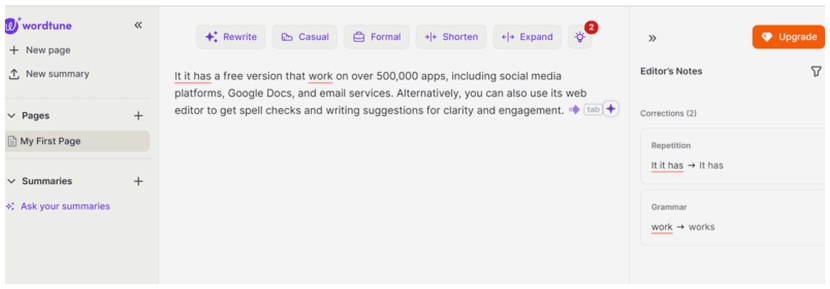
The image below showcases how Wordtune’s web editor highlights grammar errors. After you make the necessary corrections, you have the flexibility to rewrite, condense, or enhance your text, or even completely alter its tone.
Pros
- Free spell-checks, suggestions, and proofreading
- Its word suggestion tool helps learners improve their vocabulary
- Integrates well with online platforms like Google Docs and Gmail so you have real-time corrections and suggestions
Cons
- Its main use case is rewriting, so it works better alongside other grammar checkers
- Doesn’t have a readability score or plagiarism check tool
4. LanguageTool: Best for multilingual people

- Best use case: Checking the grammar of texts in multiple languages
- Pricing:
- Free
- Premium ranges between $4.99 and $24.90
- Available as: Desktop app, browser extension, web editor, Android, and iOS apps
If you want to maximize your investment in a grammar checker, look no further than LanguageTool, which supports an impressive 30 languages!
Free subscribers receive corrections on word order, verb tenses, and basic punctuation like commas. In contrast, premium subscribers enjoy advanced corrections and nuanced style recommendations. They can delve into “Picky Mode,” which highlights issues such as lengthy sentences, redundancies, and simpler word choices. Additionally, for texts exceeding 100 words, LanguageTool offers a score that reflects grammatical accuracy and readability, helping users gauge their writing quality more effectively.
You can see how LanguageTool corrected and rated the text below:

Pros
- Works in over 30 languages, including English
- A 2-year subscription reduces the monthly fee to as low as $4.99 per month
- Includes writing statistics, extensions, and add-ons
Cons
- The free version doesn’t correct as many mistakes as its competitors
- No plagiarism checker in the paid version
5. Hemingway: Best for clear writing

- Best use case: Making your writing clearer and more readable
- Pricing:
- Free
- 5K Plan for $10 per month
- 10K Plan for $15 per month
- Available as: Desktop app, web editor
Every writer should consider adding the free version of Hemingway to their toolkit. Originally designed as an editing app, Hemingway helps users identify lengthy sentences, unnecessary adverbs, and complicated verbs. The app draws inspiration from Ernest Hemingway, whose hallmark is a clear and concise writing style.
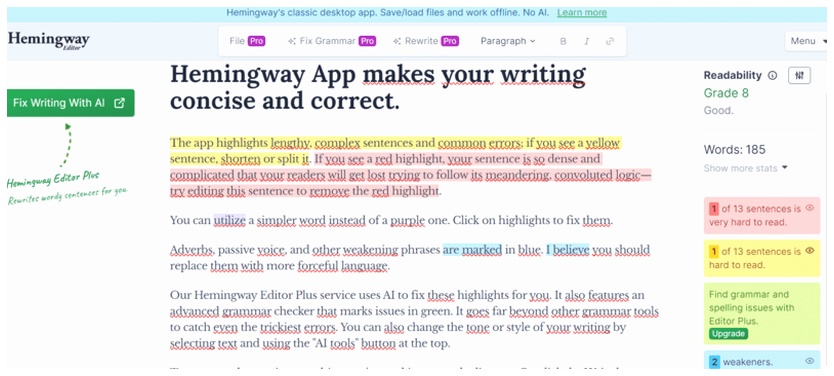
After finalizing your text, simply copy and paste it into Hemingway’s online tool. You’ll notice a colorful display: red highlights indicate overly long sentences, yellow marks signal long sentences, blue points out weak phrases, and purple suggests simpler word choices. In addition to pinpointing these common writing pitfalls, Hemingway’s Pro subscription includes a grammar checker. For added convenience, you can also purchase a desktop app for a one-time fee.
Here is how Hemingway highlights sentences in its free version:
Pros
- Great free version to make your writing punchier and clearer
- Highlights complex sentences, passive voice, adverbs, and other common writing issues
- The tool has a clean interface, making it easy to learn better writing principles
Cons
- The free version doesn’t include grammar checks
- You need the desktop app to save documents, which is not free
- May make inaccurate suggestions, for example, it marks LingualNeeds as an adverb because it ends with -ly
How to make the most of the grammar checkers
Even the most advanced grammar checkers can occasionally stumble or suggest stylistic changes that don’t resonate with your style. That’s why it’s important to view these correction apps as helpful tools rather than relying on them completely.
Here are some tips for using your free or paid grammar software better:
Use real-time checking
Mistakes are a part of being human, which is why grammar checkers are essential tools! To enhance your writing experience, try enabling the real-time checking feature. This way, you can catch errors as they happen, ensuring your work is polished and precise.
Integrate with your writing apps
Many tools come with extensions and add-ons that allow you to check your grammar across different types of documents. Whether you’re crafting a work email or writing an essay for school, you can easily ensure your writing is clear and polished.
Improve your grammar
While online grammar correctors are generally effective at identifying errors, they often miss subtle language nuances. Additionally, they can sometimes provide suggestions that are not relevant to the context.
Mastering English grammar rules empowers you to rely less on grammar checkers. With this knowledge, you won’t simply accept suggestions; you’ll grasp the reasoning behind them. Plus, you can tailor punctuation, style, and tone to suit your unique requirements.
Enhance your English skills by exploring a variety of free grammar courses available online. These courses not only help you assess your current grammar knowledge but also serve as a solid foundation for improvement. For those seeking more tailored support, enrolling in online English lessons can offer personalized feedback to elevate your learning experience.
Get feedback from experts
When studying English, whether online or in person, focus on platforms that offer personalized 1-on-1 feedback. This approach significantly enhances your grammar understanding and writing abilities, ultimately allowing you to utilize grammar checkers more effectively.
Use these apps but don’t skip learning grammar
Grammarly stands out as the top grammar checker app due to its extensive error detection, sophisticated style recommendations, and seamless integration across various platforms. However, don’t overlook other impressive options: ProWritingAid provides detailed writing reports, Wordtune excels in rewriting assistance, LanguageTool supports multiple languages, and Hemingway enhances readability with its insightful suggestions. Each of these tools brings unique strengths to the table, making them worth exploring.
When selecting a tool for your language learning, remember that no software can substitute for a solid understanding of grammar. At LingualNeeds, you can connect with over 20,000 online English tutors eager to assist you in enhancing your grammar, writing skills, and much more!
Frequently Asked Questions
What features do top grammar checkers offer?
Top grammar checkers provide rewriting suggestions, readability assessments, and browser extensions for seamless integration with various applications.
Are there free versions available for these grammar checkers?
Yes, each of the top 5 grammar checkers offers a free version, allowing users to test them out before making any financial commitment.
Which grammar checker is best for rewriting?
Wordtune is considered the best for rewriting, as it helps rewrite, shorten, and expand sentences.
What makes Grammarly stand out among grammar checkers?
Grammarly stands out due to its extensive error detection, sophisticated style recommendations, and seamless integration across various platforms.
How can I enhance my grammar skills while using grammar checkers?
To enhance your grammar skills, it’s important to learn grammar rules, use grammar checkers as tools, and seek feedback from experts.